

FCM Authentication is one of the methods to enable sending Push notifications to your app installed on Android devices. The FCM Authentication token is used to authorize server requests to Firebase services. You must generate the authentication token and upload it to the MoEngage Dashboard to send Push notifications to Android users.Documentation Index
Fetch the complete documentation index at: https://moengage-crashes-in-debug-feedback.mintlify.app/llms.txt
Use this file to discover all available pages before exploring further.
You have an app created on the Firebase console.
Authorize Server Requests to Firebase Services
You can authorize server requests to Firebase services using the Private key. FCM Private key is a service account JSON file that contains the details of the Private key generated for authenticating the service account.Steps to Generate a Private Key
Login to the Firebase console with your credentials.- Select your project.
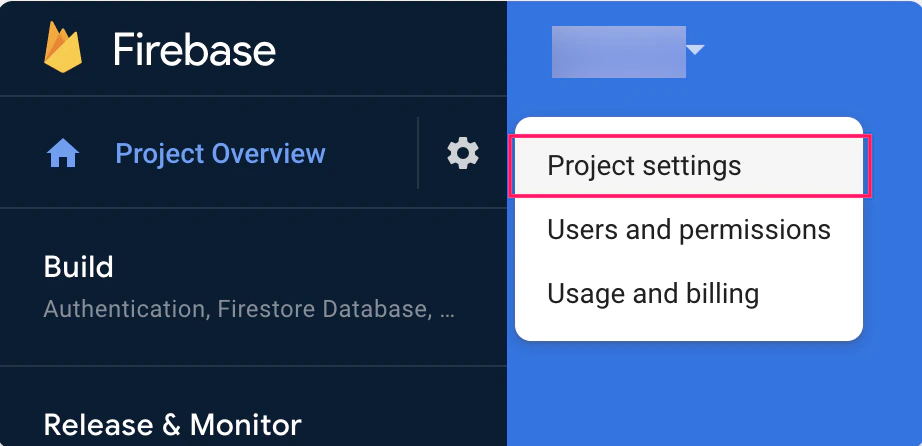
- In the top left pane, click the settings icon beside Project Overview.
-
Select Project settings.
-
On the Project Settings page, navigate to the Service accounts tab.
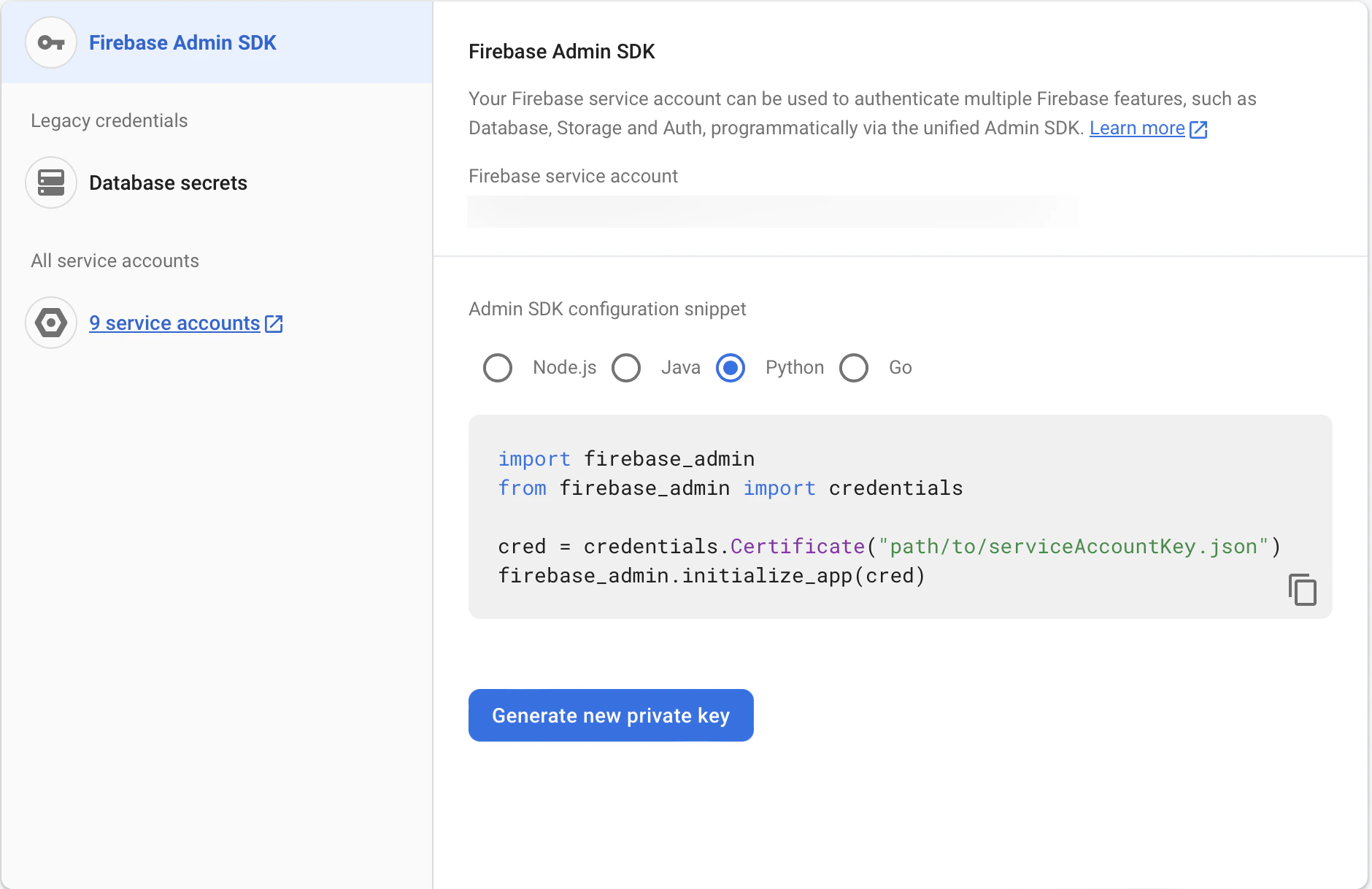
- Click Generate new private key. The language you select doesn’t matter because we just download the JSON file. The language you select provides you a sample code if you are implementing the FCM communication. MoEngage already does this for you, so select any language and generate the key.
- Confirm the same by clicking Generate Key. This will generate a JSON file containing the Private key.
-
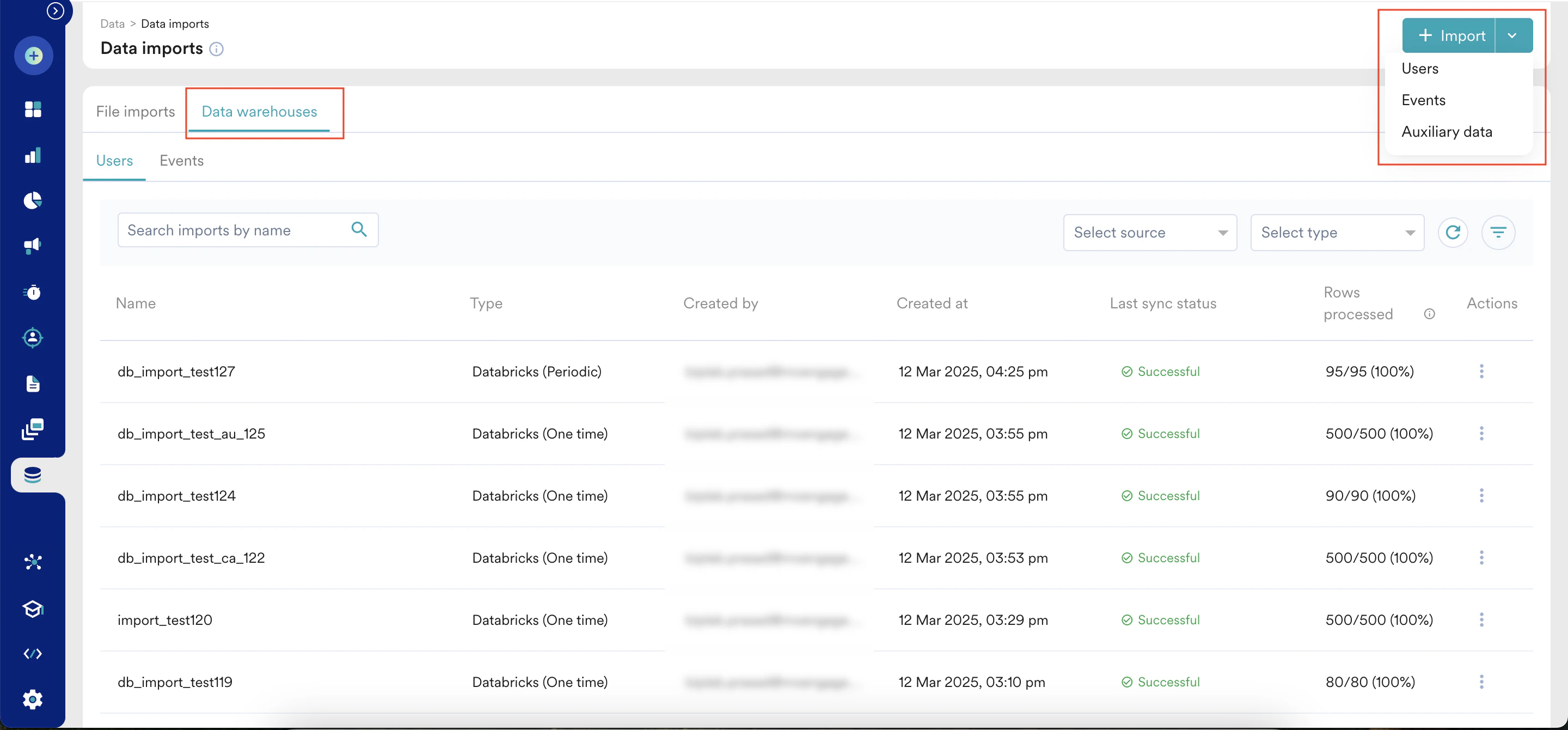
Download the JSON file and upload it to the MoEngage Dashboard at Settings > Channel > Push > App Push > Android > FCM Authentication > Private key file (Recommended).
-
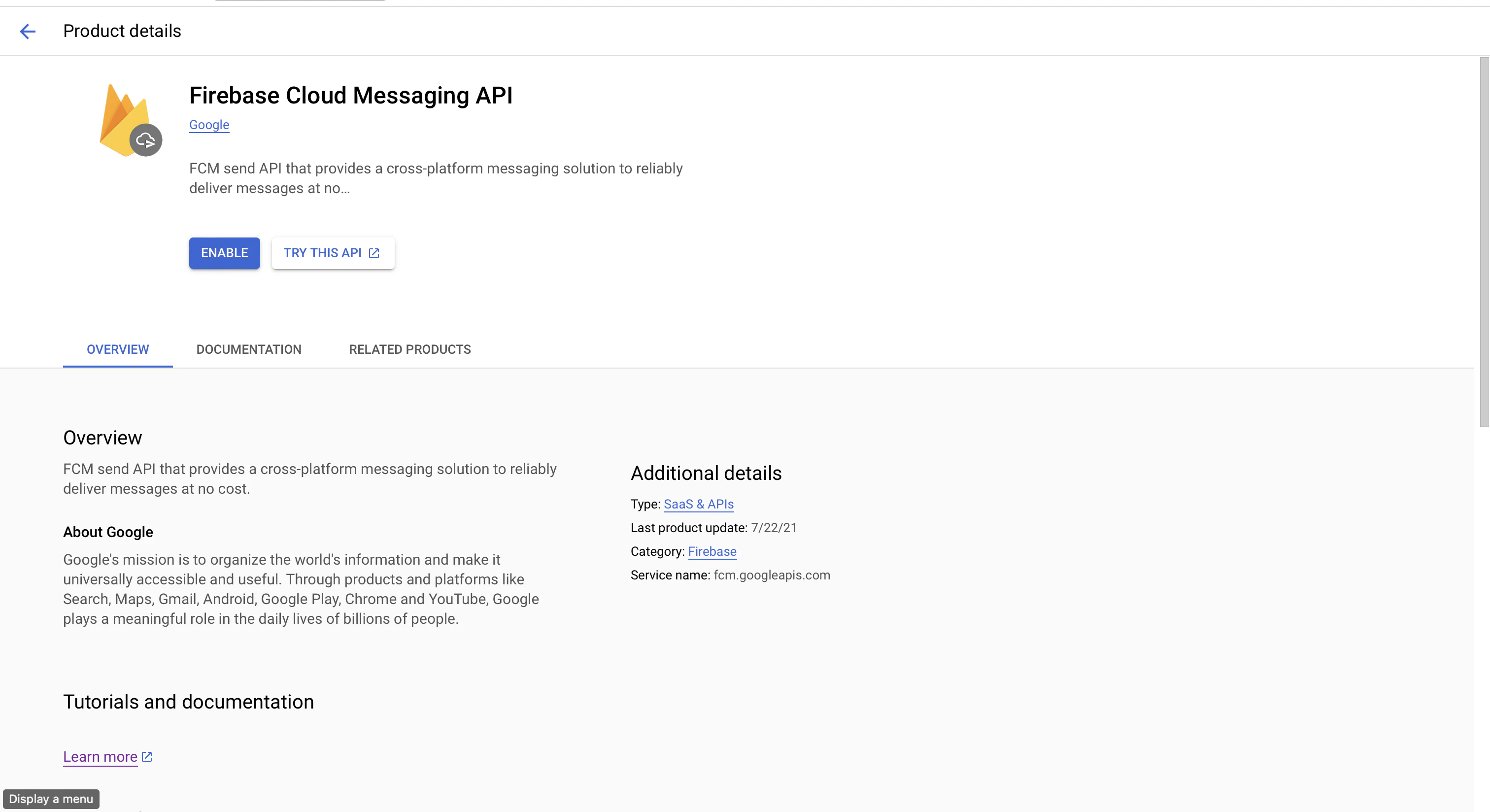
After the JSON is configured, enable FCM in the cloud console.
Changes in Sending Speed with Private Key Configuration
The Firebase Cloud Messaging API has a default rate limit of 600,000 requests per minute. For more information, refer here. If your account reaches that limit, FCM may drop those notifications with the following error:| Error | Description |
|---|---|
| FCM Message rate exceeded (Quotaexceededforquotametric…) | Sending speed is exceeding the service capacity for your FCM account. Requests beyond serving capacity are rejected to limit the ingress flow rate. This happens because of multiple campaigns being triggered at the same time at high speeds. Consider spacing out campaigns or reducing request limits in the campaign delivery control. |
With the reduction in default FCM API rate limits to 600,000 RPM, we will be changing the maximum allowed throttle speed for Push notifications to 500,000 RPM to ensure a single campaign does not breach the project limit. This change will apply to new and existing campaigns. You may still see drops because of multiple campaigns being triggered together.
- Reduce the campaign sending speed If you are seeing ‘FCM Message rate exceeded’ a lot in one-time and periodic campaigns, you might be exceeding the sending capacity beyond your allotted quota. We recommend reducing the request limits in the campaign delivery control to avoid exceeding the quota.
Because of the default rate limit of 600,000 requests per minute for FCM, we recommend setting it to a lower limit (~200,000 requests per minute) to accommodate other parallel requests such as event-triggered, business event-triggered, and flow-triggered campaigns. - Space out one-time and periodic campaigns
If you are seeing ‘FCM Message rate exceeded’ a lot in one-time and periodic campaigns, you might be scheduling multiple campaigns that are being sent out at the same time, which is increasing your overall sending speed. Therefore, space out one-time and periodic campaigns. - Request a rate limit increase from FCM To check your current limit, go to Google Cloud console > APIs & Services > Firebase Cloud Messaging API > Quotas & System Limits or directly to FCM Quotas and see the value for Send requests per minute. To request a rate limit increase beyond 600,000 RPM, contact Firebase Support.
FAQs
Is any app update or SDK change required for this?
Is any app update or SDK change required for this?
MoEngage SDKs are already compliant with these changes from FCM. You need not update MoEngage SDK when you switch to the Private key authentication mechanism.
The Server Key or Auth key is a mechanism to authenticate MoEngage to send requests to FCM on behalf of your account. It works at an account level and not at an end-user level or device level.
When you switch from Server key to Private key, all requests will be transferred to Auth key mechanism with no impact on the end user or device.
The Server Key or Auth key is a mechanism to authenticate MoEngage to send requests to FCM on behalf of your account. It works at an account level and not at an end-user level or device level.
When you switch from Server key to Private key, all requests will be transferred to Auth key mechanism with no impact on the end user or device.
By when should I migrate from Server key to the Private key Auth mechanism?
By when should I migrate from Server key to the Private key Auth mechanism?
Sending messages (including upstream messages) with the FCM XMPP and HTTP legacy APIs was deprecated on June 20, 2023 and will be removed on June 21, 2024. Refer to Deprecation of Legacy HTTP API. We strongly recommend the Private key for any request sent to Firebase services as soon as possible.
What will happen if I do not migrate to the Private key Auth mechanism?
What will happen if I do not migrate to the Private key Auth mechanism?
The FCM Server key mechanism will be deprecated on June 21, 2024. After that, FCM may continue to accept requests from the Server key auth mechanism and not deliver the notifications to the devices or it may start rejecting the API requests altogether. In both cases, your users will no longer receive notifications through FCM.
How long does it take to migrate to Private key Auth mechanism? Will there be any downtime during migration?
How long does it take to migrate to Private key Auth mechanism? Will there be any downtime during migration?
After you save the settings in the MoEngage dashboard, your account will immediately switch to using the new API to send Android push notifications including ongoing campaigns. You will not see any drops in sending push notifications during the transition.
What are the benefits of the Private key auth mechanism?
What are the benefits of the Private key auth mechanism?
The updated FCM API introduces several improvements, including the adoption of the HTTP v1 protocol and the implementation of short-lived access tokens following the OAuth2 security model, replacing the Server key authentication from the previous version. These tokens enhance security by limiting their usage to approximately one hour, minimising the risk in case they are exposed.
Are there any downsides to migrating to the Private key Auth mechanism?
Are there any downsides to migrating to the Private key Auth mechanism?
With the Private key Auth mechanism, the Firebase Cloud Messaging API has eliminated the bulk sending mechanism and has a default rate limit of 600,000 requests per minute. For more information, refer here. If your account reaches that limit, FCM may drop those notifications. Given bulk notifications are no longer supported, you may see a reduction in campaign sending speed for bulk campaigns such as one-time and periodic campaigns.
MoEngage has proactively reduced the maximum allowed throttle speed for Push notifications to 500,000 RPM to ensure a single campaign does not breach the project limit. This change will apply to new and existing campaigns. You may still see drops because of multiple campaigns being triggered together. To learn more, refer to changes in Sending Speed with Private Key Configuration.
MoEngage has proactively reduced the maximum allowed throttle speed for Push notifications to 500,000 RPM to ensure a single campaign does not breach the project limit. This change will apply to new and existing campaigns. You may still see drops because of multiple campaigns being triggered together. To learn more, refer to changes in Sending Speed with Private Key Configuration.
How can I know that the delivery is made through the new authentication method instead of the old one?
How can I know that the delivery is made through the new authentication method instead of the old one?
When you set the authentication as a Private key, the changes are accepted immediately and will be used for sending subsequent requests.